In Action
See it work
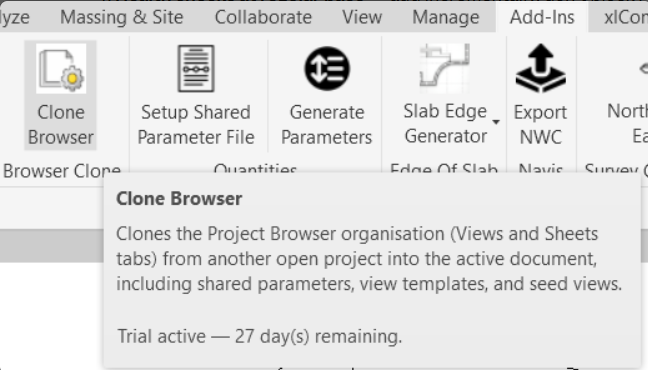
One button in the ribbon — hover for details
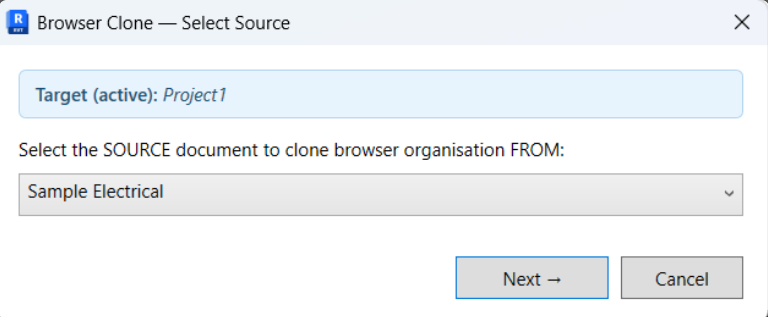
Pick the source project to clone from
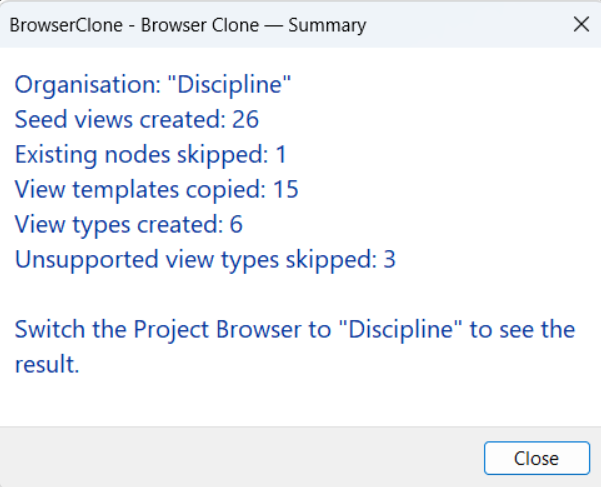
Clear summary of what was created
Browser Clone copies the entire Project Browser organisation from a template into any project — folder structure, shared parameters, view templates, and seed views in one click.
Browser Clone reads the source project's active browser organisation and recreates the entire folder hierarchy in the target — with all the plumbing handled automatically.
Copies the browser organisation element itself — including all grouping levels and sorting rules. If the target already has a matching org, it's reused automatically.
Custom grouping parameters (shared or project) are created in the target and bound to the Views category — matched by GUID for shared params, by name for project params.
Any view templates referenced by seed views are transferred automatically. Existing templates with the same name are reused — no duplicates.
One lightweight "ZZ Seed" view is placed in every leaf folder so the browser tree appears immediately. Folders that already contain real views are skipped.
View family types are matched by name or duplicated from the source. Floor Plans, Ceiling Plans, Structural Plans, 3D, and Drafting views are all supported.
Running again cleans up old seed views first, then recreates them. Real views you've added to the target are never touched — only "ZZ Seed" views are managed.
Open the template, open the target, click the button.
Open your template project (with the browser organisation you want) and the target project in the same Revit session.
Run the command from the ribbon. If multiple projects are open, a picker lets you choose the source. If only one other project is open, it's selected automatically.
The browser organisation is copied, parameters are created, templates are transferred, and seed views populate every folder. A summary shows what was created.
Start with a full-featured 30-day trial — no credit card, no email required. Upgrade to a permanent license whenever you like.
30 days · No credit card needed
One user · Revit 2025 & 2026